Determining the root companyid
Revision as of 08:32, 19 June 2013 by Arthur Lathrop (talk | contribs)
Revision as of 08:32, 19 June 2013 by Arthur Lathrop (talk | contribs)
The Root Company ID can be determined by Global User Administrators by navigating to the internal organization hierarchy and hovering one's mouse over the top-most company on the hierarchy.
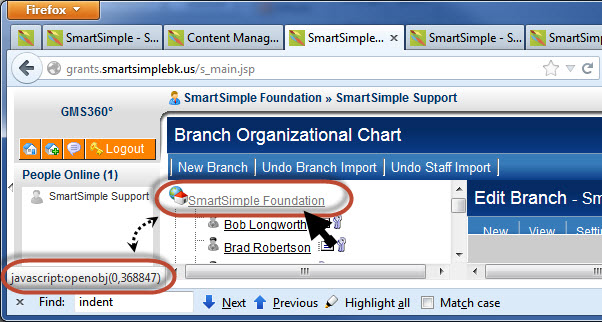
The JavaScript message at the bottom left of the screen will display the root company ID. In this case, 368847.
- Visibility Condition
- Advanced Logic
- Determining the Application ID
- Determining the Category ID
- Determining the Company ID
- Determining the Custom Field ID
- Determining the Event ID
- Determining the File ID
- Determining the Folder ID
- Determining the Opportunity ID
- Determining the Report ID
- Determining the Role ID
- Determining the Root Company ID
- Determining the Status ID
- Determining the Type ID
- Determining the User ID
- Determining the Workflow ID