Difference between revisions of "Determining the applicationid"
From SmartWiki
| (8 intermediate revisions by the same user not shown) | |||
| Line 1: | Line 1: | ||
| − | The '''Application ID''' (or appid) is the | + | The '''Application ID''' (or appid) is the system's unique numerical value associated with each {{UTA}}. |
| − | In order to determine the | + | In order to determine the Application ID: |
| − | * | + | * Click into the [[UTA Settings]] page. The default tab is the ''General'' tab; the Application ID will be displayed at the top of the page: |
| − | |||
| + | [[Image:Terminology_settings_Oct2014.png|link=]] | ||
| − | |||
| − | |||
| − | + | From within the {{UTA}}, you can obtain the application ID using the following variable: | |
| − | From within the | ||
* @apptype@ | * @apptype@ | ||
| + | ==See Also== | ||
| + | {{DeterminingIDs}} | ||
[[Category:Universal Tracking Application]] | [[Category:Universal Tracking Application]] | ||
Latest revision as of 09:12, 8 October 2014
The Application ID (or appid) is the system's unique numerical value associated with each .
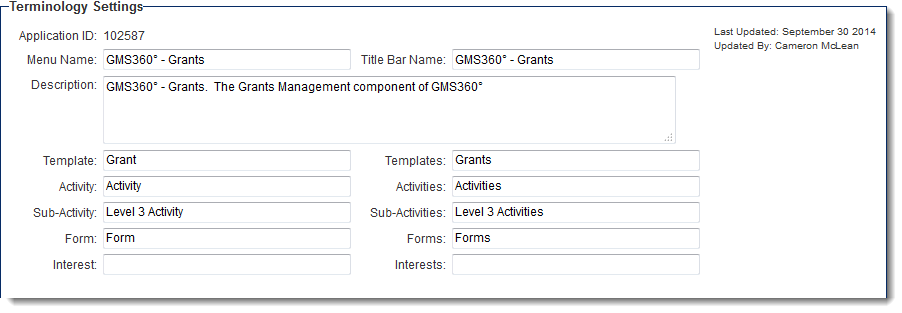
In order to determine the Application ID:
- Click into the UTA Settings page. The default tab is the General tab; the Application ID will be displayed at the top of the page:
From within the , you can obtain the application ID using the following variable:
- @apptype@
See Also
- Visibility Condition
- Advanced Logic
- Determining the Application ID
- Determining the Category ID
- Determining the Company ID
- Determining the Custom Field ID
- Determining the Event ID
- Determining the File ID
- Determining the Folder ID
- Determining the Opportunity ID
- Determining the Report ID
- Determining the Role ID
- Determining the Root Company ID
- Determining the Status ID
- Determining the Type ID
- Determining the User ID
- Determining the Workflow ID

