Difference between revisions of "Workflow Task Type: Generate PDF File"
From SmartWiki
| Line 14: | Line 14: | ||
* [[Selecting Recipients in an Acknowledgment Workflow]] | * [[Selecting Recipients in an Acknowledgment Workflow]] | ||
| − | [[Category:Workflows]] | + | [[Category:Workflows]][[Category:PDF]] |
Revision as of 11:38, 6 August 2013
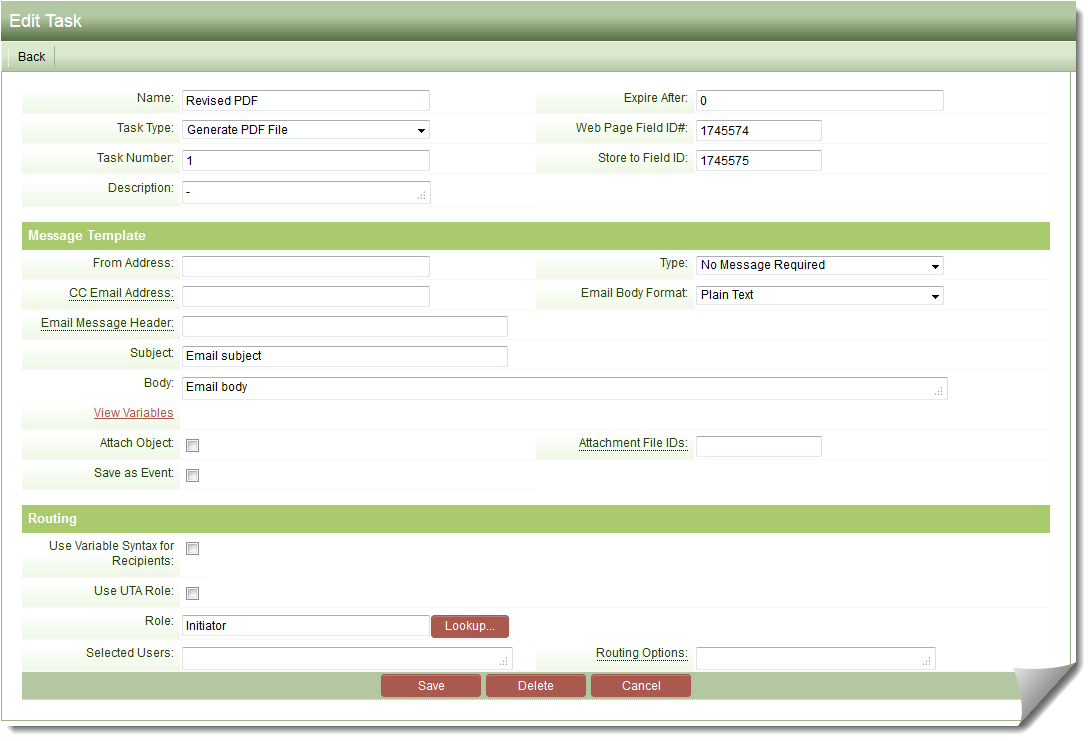
Auto generation of a PDF that can be:
- E-mailed to the person(s) designated in the workflow step.
- Stored within a Multiple Files Custom Field.
The PDF generated must be based upon a Web Page View Custom Field. You must specify the Custom Field ID of the Web Page View to be converted in the Web Page Field ID#: field on the Workflow Task settings.
If you wish to store the PDF, you can specify the field ID of the Multiple Files custom field in the Store to Field ID field on the Workflow Task settings.
- Note: the Custom Field must be a Custom Field Type: Link – Multiple Files